How AI Image Generators Work (Step by Step)
Only a few years ago, the idea of creating a detailed image simply by typing a sentence sounded like science fiction. Today, AI image generators can produce realistic portraits, fantasy landscapes, product mockups, digital paintings, and illustrations in just a few seconds.
Type something like, “A golden retriever surfing on a tropical beach at sunset,” and an AI can turn those words into a completely new image.
It feels almost magical—but there’s actually a fascinating process happening behind the scenes.
AI image generators don’t search the internet for existing pictures or stitch together photographs. Instead, they create entirely new images by learning patterns from millions of examples during training and then generating new visuals from scratch.
Here’s a simple, step-by-step explanation of how it all works.
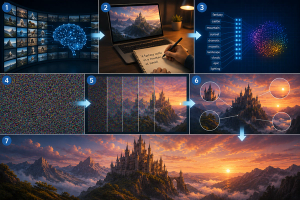
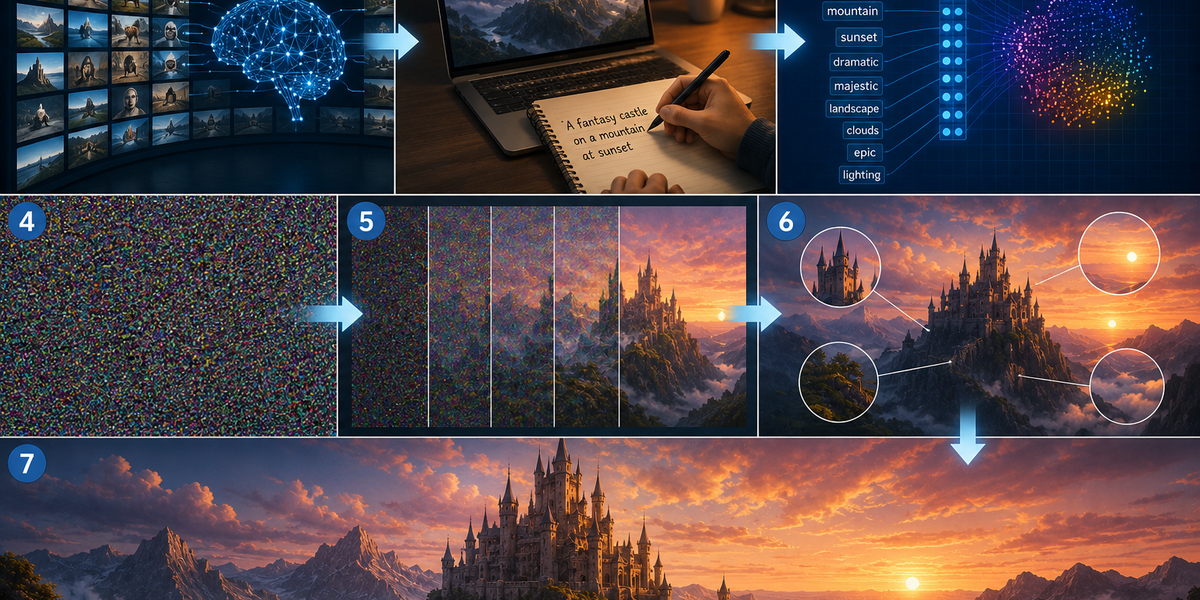
Step 1: The AI learns from millions of images
Before an AI can create images, it first needs to be trained.
During training, the model analyzes millions of image-and-text pairs. Each image is paired with a description explaining what’s shown.
For example, the AI might see:
- A photo of a cat labeled “orange cat sitting on a sofa.”
- A landscape labeled “snow-covered mountains at sunrise.”
- A painting labeled “watercolor flowers in a glass vase.”
Over time, the AI begins recognizing patterns.
It learns what cats generally look like, how sunsets affect lighting, what mountains look like from different angles, and how artistic styles differ from photographs.
Importantly, the AI isn’t memorizing individual pictures. Instead, it’s learning the relationships between words and visual features.
Step 2: You write a prompt
Everything starts with your prompt.
A prompt is simply a description of the image you want to create.
For example:
“A futuristic city at night with flying cars and neon lights.”
The more detailed your description, the more guidance the AI receives.
Details about lighting, colors, camera angles, artistic styles, clothing, weather, or emotions all help shape the final image.
The AI first analyzes your prompt to understand what elements should appear and how they relate to one another.
Step 3: The AI converts words into meaning
Computers don’t naturally understand language the way humans do.
Before generating an image, the AI transforms your written prompt into a mathematical representation that captures its meaning.
Instead of seeing the word “dog” as just five letters, the AI connects it to everything it learned during training—its appearance, shape, colors, common surroundings, and relationship to other objects.
It does the same for every word in your prompt.
By combining all these meanings together, the AI develops an internal understanding of the scene you’re describing.
Step 4: The image begins as random noise
This is one of the most surprising parts of the process.
The AI doesn’t begin by drawing an outline or sketching objects.
Instead, it starts with what looks like pure television static—a completely random collection of colored pixels called noise.
At first, this random image contains no recognizable objects whatsoever.
It’s just visual randomness.
Step 5: The AI removes the noise
Now the real magic begins.
Using what it learned during training, the AI gradually removes the random noise step by step.
With each pass, the image becomes slightly clearer.
Shapes begin to emerge.
Colors become more organized.
Objects slowly take form.
If your prompt described a beach, the AI gradually develops sand, waves, and the sky. If you asked for a cat, features like ears, whiskers, and eyes slowly appear.
This process continues dozens or even hundreds of times until the image matches the prompt as closely as possible.
It’s similar to watching a blurry photograph slowly come into focus.
Step 6: Details are refined
Once the main scene has formed, the AI begins improving smaller details.
It adjusts lighting, shadows, textures, reflections, colors, facial expressions, and object placement.
It also ensures the various parts of the image fit together naturally.
For example, if you requested sunlight coming from the left, the shadows should appear on the right.
If you asked for snow, the surrounding environment should reflect winter conditions.
The AI continuously checks whether the image still matches your prompt while refining these details.
Step 7: The final image is generated
After completing all of its refinement steps, the AI produces the finished image.
The result is a completely new picture that didn’t previously exist.
Even if two people enter exactly the same prompt, they may receive different images because the AI introduces randomness during the generation process.
This is one reason AI image generators can produce endless variations of the same idea.
Each image is unique.
Can AI copy existing images?
This is a common misconception.
Modern AI image generators aren’t designed to search the internet and paste together existing pictures.
Instead, they create new images based on the patterns they learned during training.
You can think of it as similar to how a human artist learns.
An artist studies thousands of paintings throughout their life, develops an understanding of shapes, colors, and composition, and then creates original artwork inspired by what they’ve learned.
AI image generators work differently from humans, but they also generate new images rather than retrieving existing ones.
A blend of creativity and computation
AI image generation combines language understanding, pattern recognition, and advanced computing into a remarkably fast process.
It begins by learning from millions of examples, interprets your written prompt, starts with random visual noise, gradually transforms that noise into recognizable objects, refines countless details, and finally produces a completely original image.
Although the mathematics behind these systems is incredibly sophisticated, the basic idea is surprisingly simple: the AI has learned what different things generally look like and uses that knowledge to build a new image one step at a time.
The next time you type a prompt into an AI image generator, remember that you’re not searching for a picture—you’re watching a machine create one from scratch, transforming words into pixels in just a matter of seconds.